On this page
Actions Tab Reference
Purpose
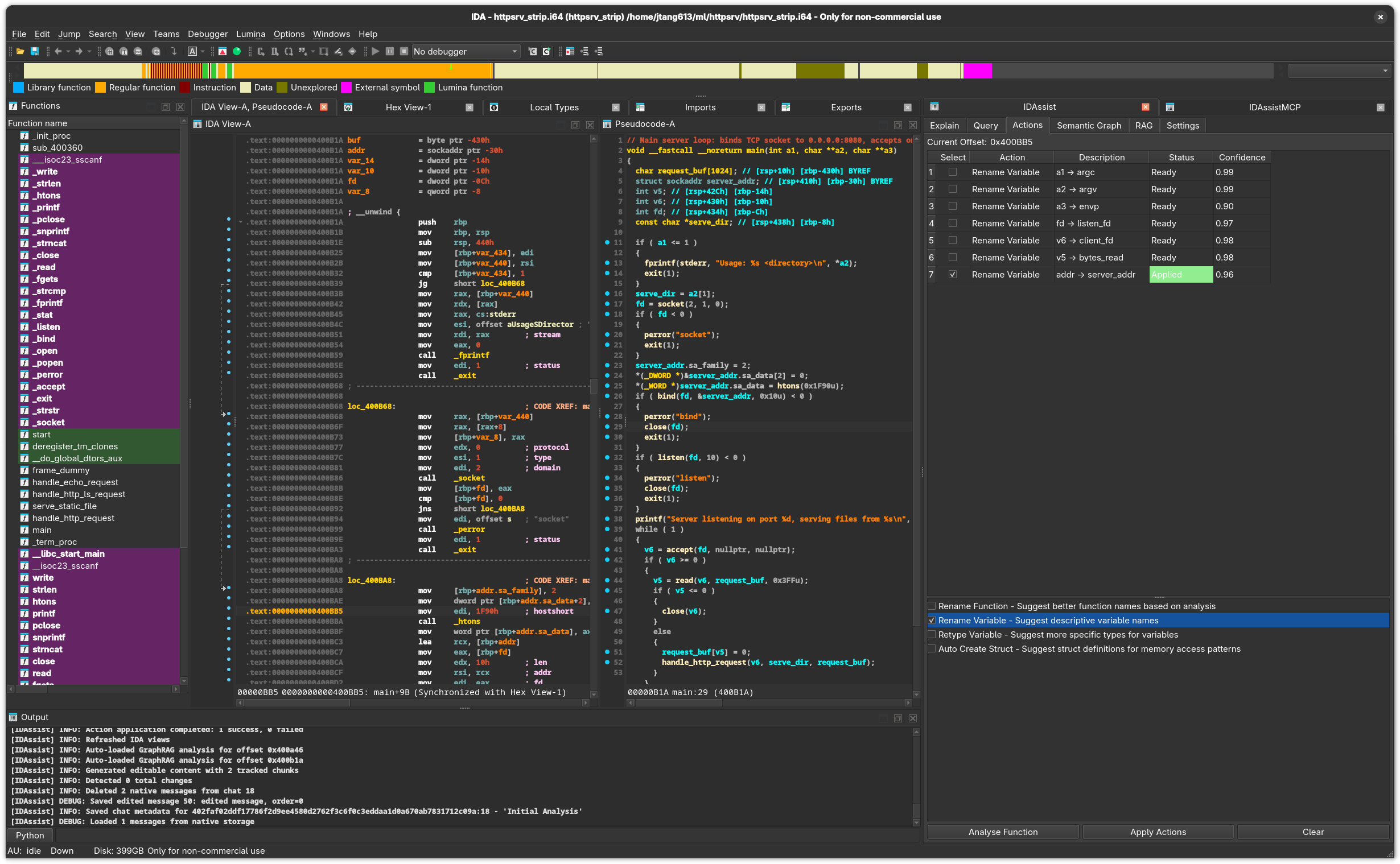
The Actions tab uses LLM analysis to suggest renames for functions, variables, and types, and can propose structure definitions. You review proposed changes in a table with confidence scores, then selectively apply them back to the IDB.
UI Elements
Top Row
| Element | Description |
|---|---|
| Current Offset | Address of the function under the cursor. |
Proposed Actions Table
Displays the LLM’s suggestions after analysis:
| Column | Description |
|---|---|
| Select | Checkbox to include this action when applying. |
| Action | The type of action (rename_function, rename_variable, retype_variable, create_struct). |
| Description | Human-readable description of the proposed change. Editable — double-click to modify. |
| Status | Current state: Pending, Applying…, Applied, or Error. |
| Confidence | Model’s confidence score (0.0 to 1.0). |
Status Color Coding:
| Status | Color |
|---|---|
| Applying… | Light yellow background |
| Applied | Light green background |
| Error: … | Light red background |
Available Actions
Checkboxes to control which action types the LLM should suggest:
| Action | Description |
|---|---|
| Rename Function | Suggest a meaningful name for the current function. |
| Rename Variable | Suggest meaningful names for local variables and parameters. |
| Retype Variable | Suggest corrected types for variables. |
| Auto Create Struct | Propose structure definitions based on field access patterns. |
Button Row
| Button | Description |
|---|---|
| Analyse Function | Send the current function to the LLM with selected action types. |
| Apply Actions | Apply all checked actions from the table to the IDB. |
| Clear | Remove all proposed actions from the table. |
Workflow
- Select action types — Check which kinds of suggestions you want (rename functions, variables, etc.)
- Click Analyse Function — The LLM analyzes the function and populates the table
- Review proposals — Check confidence scores, read descriptions, edit if needed
- Select actions to apply — Use checkboxes to choose which changes to make
- Click Apply Actions — Selected changes are applied to the IDB
Action Types
Rename Function
Suggests a descriptive name based on what the function does. The LLM considers: - Function behavior and purpose - Called APIs and library functions - String references and constants - Calling context
Rename Variable
Suggests meaningful names for local variables and parameters. Works best with Hex-Rays pseudocode where variable roles are clearer.
Retype Variable
Proposes corrected types when the decompiler’s type inference is wrong or too generic (e.g., changing int to HANDLE or char * to const wchar_t *).
Auto Create Struct
Analyzes field access patterns to propose structure definitions. Useful when the decompiler shows repeated offset-based access to a data pointer.
IDA-Specific Details
- Function renames are applied via
ida_name.set_name() - Variable renames use
ida_hexrays.rename_lvar()(requires Hex-Rays) - All IDB modifications execute on IDA’s main thread via
execute_on_main_thread() - The
execute_on_main_thread()wrapper usesidaapi.execute_sync(callback, MFF_FAST) - Structure creation requires Hex-Rays for type system integration
Related Documentation
- Explain Tab — Understand a function before applying actions
- Query Tab — Ask questions about specific rename choices
- Settings Tab — Configure the LLM provider used for analysis